Author: Leethompson

  • The Power of a Like – Social Media Engagements

    The Power of a Like – Social Media Engagements

    What is a like and why does it matter to your page’s engagement? Well in many ways a “like” is almost like an acknowledgement from someone to say “I’ve saw your content in my news feed”. But does it infer that they’ve read your post?
    reactions like love laugh
    Photo by George Pagan III on Unsplash

    If you know anything about Social Media, you will know that almost all Social Media platforms favour content which is meaningful, particularly if you are using Facebook in your social media strategy. Reactions are a way of users interacting with a post to show Facebook that this is content they are interested in and would like to see more of this.

    There are currently 6 reactions a user can choose from on Facebook to interact with a post. Like, Love, Ha ha, WOW, Sad and Angry.

    So why reactions? Why not just keep it simple with a like?

    Consumers are driven by emotion, and emotion is key in deciding whether to purchase something. A like is something a Facebook user can click quickly and move on, like we mentioned earlier, it does not necessarily mean that the person has read the post. They may have liked the image, they may have seen a word they were drawn to when scrolling.

    Reactions require thought, they require a user to have stopped, read and decided which emotion the post invokes. They allow a business to understand how current, past and future clients/customers feel about their business and brand. They also provide useful metrics for strategy planning for future content and advertising campaigns.

    For example: By measuring how many negative, or angry reactions you get on a certain type of post, allows for future planning into ensuring that this type of post and content is omitted in future. Measuring positive reactions such as love allows you to plan more of this type of post or content as it is what your audience want to see.

    Engagement Bait

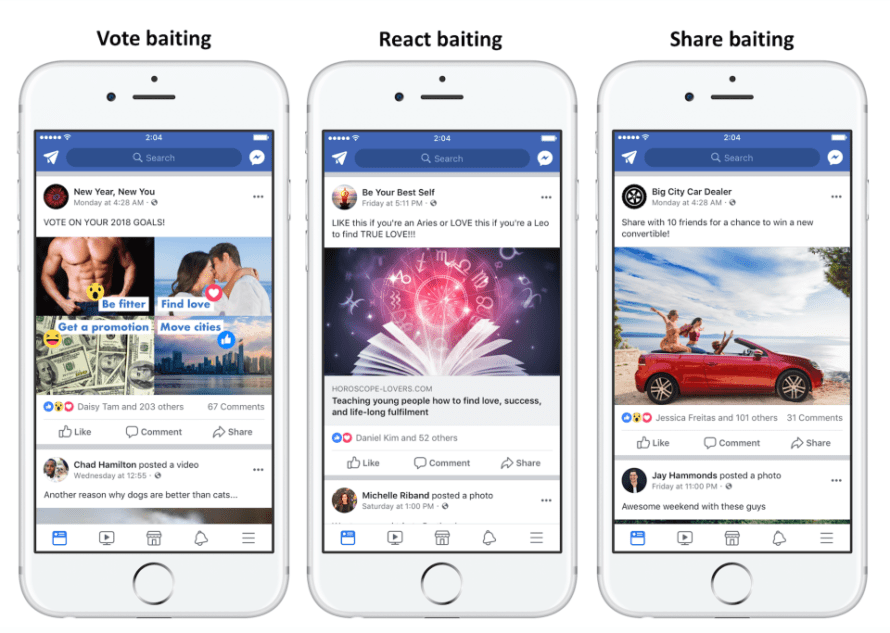
    Facebook is cracking down on ‘Engagement Bait‘ posts, the type of posts they believe are undercutting their algorithm. You know the posts. Like if you are an Aries, love if you are a Capricorn etc. They want to see more authentic engagement, users engaging with businesses because they are interested in it.
    like engagement baiting
    Engagement Baiting

    How can you boost reactions?

    Boosting the reactions you get on posts is easier than you think. Believe it or not, business ‘selling’ posts should only actually account for around 25% of your posts. Any more than this makes your audience switch off.

    So what should you post instead? You could;

    • Make your audience giggle with a meme or a joke post.
    • Post about something current but non business related (just be wary of anything that could offend, antagonise or alienate people – that’s a sure fire way to getting an angry reaction).
    • Post about something relating to your business – for example; an estate agent could post about tips for moving day.
    • Tell a story – this could be a live (or even pre-recorded) video giving insight into your day to day life in your business, showing the production of an item you sell, giving an introduction to a member of your team!
    • Post about the office/shop/work environment.
    • Post Selfies – you or one of your team happen to be working somewhere other than the office? Having a meeting in a coffee shop? Your environment might not seem that interesting to you but people love to see the people and the places behind the business/brand.
    • Have a random thought? Still wondering if penguins have knees? (They do by the way!) Share it… you never know who might also be thinking it.
    • Share uplifting and inspiring quotes – tap into the user’s feelings.

    There are so many more ideas for posts that would invoke a reaction from the Facebook community. By building a Social Media strategy plan for your business, you can plan your social media content to include all of these reaction promoting post types. If you need any help in building your business’s Social Media Strategy, get in touch.
  • Page Likes! Invite All? Please, Don’t! It’s more damaging than you think!

    Page Likes! Invite All? Please, Don’t! It’s more damaging than you think!

    The vast majority of us will have had a Facebook notification over the weekend where someone has invited you to like a business page. It’s a viral post that comes around every now and again with different headings. It’s usually posted onto business pages encouraging their followers to “support their business”. Business page likes skyrocket, and everything seems good in the world.

    page likes
    Photo by NeONBRAND on Unsplash

    But here is the thing, many businesses don’t seem to understand that their page likes/follower number is only a number, it means very little!

    Facebook is a community, and there is no secret or magic formula to instant success! Gaining hundreds of new page likes in a short space of time is only actually useful if ALL of these new page likes are within your target audience.

    Build YOUR Community

    Let us pose a question to you. Would you prefer to have an audience of 500 people who were interested in your business, products and services and who are likely to use your business either now or in the near future OR would you prefer to have an audience of 50,000 people who scroll past your posts paying them very little attention or even hide them from their timeline?

    We’d hope you would prefer an interested 500 strong audience. People who will stop, react and engage with your posts.

    page likes
    Photo by William White on Unsplash

    Surely a bigger audience is better!

    The biggest issue with the post we spoke about earlier is the types of people being invited to join your audience.

    How about an example? Let’s say your business is small nail salon based in Newcastle city centre. You ask your followers to invite everyone on their friends list. Pick out one of your followers who might do this for you. They click Invite All and BAM, they’ve invited their dad, uncle, great uncle, a vast number of male friends who think a manicure is just trimming their nails with the clippers, 138 people with whom they went to University. 112 of these people live in Plymouth, 8 live in Devon and the remaining 18 are scattered across the globe. None of these are YOUR audience. They’re people who will either ignore the request or will accept it and then begin to ignore your posts, the latter being the ones who will affect your page growth the most. They have all just become a pointless statistic on your business page.

    So how can you grow your page?

    Ensure that you are present and consistent! Post daily, at times when most of your followers are online (information you can get from your page insights).

    Build relationships with your audience. If they comment on your content – reply! Have a conversation with them. Conversations with your audience can often highlight what they want to see from you and what you can do to convert their interest into a purchase.

    If you feel like you need to, use a Facebook ad to speed up the process. You can target your adverts audience to be YOUR people, people who will be interested in what you do, what you have to say and will have conversations with you.

    content page likes create
    Photo by “My Life Through A Lens” on Unsplash

    Think about the type of content that you are posting. Does your post give knowledge, make people laugh or make them think? If not what’s the reason behind posting it? If you sell a service, why do people need your service? What are the issues or pain points which need your service as their solution? Once you find out what problems people face that your service fixes you can focus your content around helping them to minimise or resolve these pain points. If you sell a product, why do people need that product and what difference will it make to them and their lives?

    We get it! Right now, we’re living in unprecedented times and we are all doing everything that we can do to ensure that we survive throughout this and come out of the other side strong and ready to go, but don’t undo all of the hard work up to this point by copying and pasting an invite all viral post. If you need any advice on how to grow your business on Social Media either organically or the best way to make use of Facebook ads for this purpose, get in touch. We’d love to have a conversation with you about it.

  • Social Media Tools – Tips, tricks and efficiency hacks!

    Social Media Tools – Tips, tricks and efficiency hacks!

    Managing a businesses social media can be time consuming and we all know that time is precious. There are so many different tools which claim to be the best at managing your business social media accounts. But without spending more precious time trialling them all how would you know which tools will improve your efficiency?

    At Social+, we’ve taken the hard work out of it for you! We have spent time trialling and using different tools in our business. Here is what we recommend:

    Images

    We all need to be aware of copyright rules, using someone else’s work without their consent is against the law and you can be hit with a hefty fine for doing so. It goes without saying that finding good quality royalty free (which just means the creator has already given consent for their image to be used) is important. We use a range of websites to download images from, all of which are royalty free. Try Unsplash, Pexels, Pixabay for your general photographs and CleanPNG for more clipart style images.

    We all want to make our content original, to make original imagery, we use Canva. In Canva, you can create images to the correct size for the social media platform the content is intended for, this ensures that none of your image is lost when its displayed to your followers.  Canva also has a handy app to download to your phone so you can create and download images to your phone.

    camera
    Photo by Markus Spiske temporausch.com from Pexels

    Hootsuite

    If you use Twitter, LinkedIn or Pinterest in your business, then scheduling is simple using Hootsuite. We use Hootsuite for our own business as well as managing the scheduling for our clients too. You can add hashtags, images and links in the easy to use composer. Hootsuite is also available as a mobile app.

    Phone with Instagram App

    Planoly

    Instagram does not have its own inbuilt scheduler and so people often report finding Instagram hard to keep on top of. Remembering to post at your business’s optimum time of day and keeping an aesthetically pleasing feed going can be difficult. With Planoly, you can upload your images and schedule posts and stories to post at a time of day you specify! Planoly is also available to download as a mobile app where you can do your scheduling and receive notifications confirming posting has been done.

    Facebook

    Facebook scheduling is a little bit different, we always recommend that Facebook scheduling is done on Facebook. We’ve done testing on different scheduling tools and compared them to the results of posts scheduled on Facebook and have found that they tend to be shown to a wider audience than those scheduled on 3rd party apps. We use the Pages for Facebook app on our phones for when we are out and about to manage posts and notifications.

    Business Manager for Facebook

    Because Facebook pages are attached to our own personal Facebook accounts, it is so easy to miss important business notifications from your Page amongst all the rest of the notifications you receive on a daily basis. Therefore, we always recommend that when using a laptop or desktop computer you set up a Business Manager for Facebook account. You can find Business Manager here and its as easy as signing in to your own Facebook to sign up! Business Manager shows only your business page notifications, ensuring that no comment or message gets missed.

    Insights and Analytics

    All social media platforms when used for business purposes have insights. We always recommend that these insights are analysed on (at the very least) a monthly basis. These insights allow you to analyse your social media accounts to see what is working, what isn’t and can give you a great starting point on your next week/month/quarter’s strategy.

    Image by Arek Socha from Pixabay

    Strategy Planning

    Do you plan a strategy when tackling your business social media platforms? If you do, then well done! Strategy planning keeps you focused, it means that you know what you will post on which day, on which platform and why! If you don’t, then our next question for you to ponder is, why not? If you need help on strategy planning or simply would like a copy of our easy to use and insightful content calendar, please visit our contact us page and drop us a message.

    Video Content

    Video content works well for engaging with your followers, whether it be a video you have uploaded yourself or you have gone “live” on Facebook or Instagram. But it is important to try and ensure that the video content is accessible to all. Some of your followers may not watch video with sound on, will they miss out on important points in your video? Subtitling your video content makes it accessible to those people who don’t watch with the sound on or even for whatever reason are unable to listen to the video content. Adding subtitles to video is easy with Kapwing. There is a free version of this service which adds a Kapwing watermark, removing the Kapwing watermark is easy by upgrading to the paid version of this app.

    LIVE

    We’ve written about a lot of different tips and tricks in this post. All of which we use personally in our day to day business and when we are delivering training. If you require training on any of the above, then do not hesitate to send us a message on our Facebook page or via the contact us section of our website and we will only be too happy to discuss training packages with you!

  • Instagram for Business – Are you doing it right?

    Instagram for Business – Are you doing it right?

    Were you aware that 77% of consumers are more likely to buy from businesses they follow and interact with on social media? Instagram is the shop window to your business. It is the perfect way to showcase the products and services you provide. There are now more than 1 billion users on Instagram, waiting to interact with your brand and so optimising your account for business is key.

    Optimise your business’s Instagram account

    So how do you optimise your Instagram account for business purposes? Firstly, ensure that you have a link to your website in your bio section of your account. After all, there is no point in putting the rest into practise if buying your products or booking your services isn’t easily accessible.

    Phone with grid and Instagram Logo
    Photo by Luke van Zyl on Unsplash

    Consistency is Key

    Be consistent with your business’s Instagram account. Whether it be the time that you post, the type of image that you are posting or the voice you are using in the caption to go with the image. Your followers will have an expectation of your business and breaking consistency can damage the relationship you have with your followers.

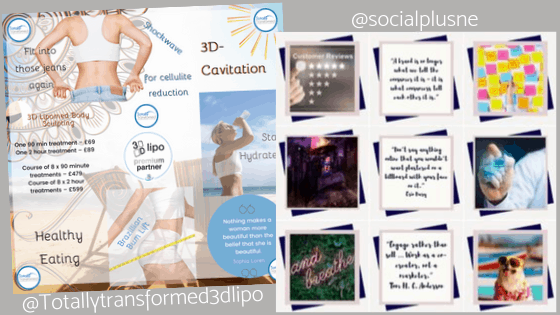
    The same goes with your grid design. Your ‘grid’ is your Instagram feed. Sticking with a consistent layout and design improves the overall look of your ‘showcase’. The way in which your Instagram grid is set out and its aesthetic appeal is said to be a huge deciding factor in whether a user engages with your posts or clicks on that follow button!

    Use High Quality Images

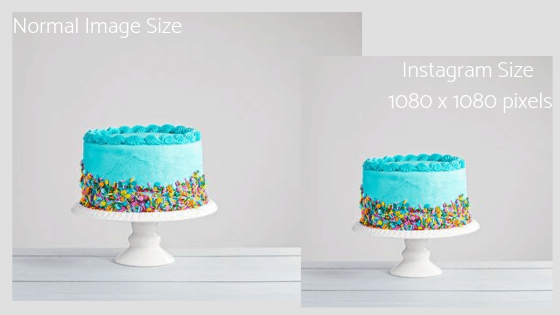
    Are you using high quality images which meet the Instagram size requirements? All too often, we see businesses posting images which are blurred or have been zoomed in and quality is lost. We also see images posted which end up with the edges cut off them because they do not meet the size requirements for Instagram. For your images to look the way you want them to, it is recommended that you use high quality images, if you are taking a photo of something , make sure that the surroundings are clean and don’t detract focus from the actual photo. Finally, crop the image size to fit 1080 x 1080 pixels.

    Instagram Image Sizes

    Instagram Grid – Why is the way it looks important?

    If your business operates from a bricks and mortar shop, then we can guarantee that you have put thought into its layout, the placement of your products and the way it looks to shoppers who walk into your store. Similarly, if you retail online, you will have thought about the way you place your products on your website. It’s the same with your Instagram feed. Keep the images you post relevant and easily identifiable as your business. Your Instagram feed should represent your brand at its best!

    Example Instagram Grids created by Social+

    Your Followers

    Having thousands of followers is all well and good, but are those followers adding value to your business? Instagram is a community and its algorithm will expect businesses to be following a community spirit, posting conversation provoking images and replying to comments they receive. Its important to get into the community spirit to ensure that your images are being seen on your followers feed. 500 engaged followers are better than 50,000 disengaged followers. Instagram have been clamping down on the fake follower culture and removing followers that have been bought by brands and influencers to falsify their popularity. Creating content to cause meaningful interaction is far more valuable to you and your brand than them being there as just a number

    Stories

    Your grid is consistent, you have the engaged followers and you are posting your images every day at the optimal time for your followers. But how do you ensure that you always stay at the top of your followers feed? Stories are a great way to stay relevant, they don’t mess with your consistent, well thought out Instagram grid, you can choose to save them in highlights (more on those later!), and they’re always at the top of every followers Instagram feed!

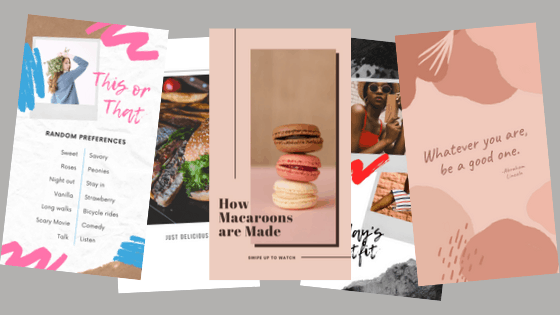
    Brands can use stories to give their followers a behind the scenes insight into the business, share another users content (like a client or a customer raving about your product or service), learn more about the business and the people behind it or even just show the fun side of the brand, the possibilities are endless. Building in additional features like stickers and hashtags, stories can provoke conversations and engagement. Remember what we said earlier about engaged followers being more important to a business than the actual number of followers on their account.

    Examples of Instagram Stories

    Highlights

    Sometimes stories have an important message. It might showcase a brand product you want your followers to revisit at a later date, it might show a great day behind the scenes in your business that shows a personal and friendly side to the brand or it may be that you had a poll on your story and followers might want to go back and see the results of that poll.

    The great news is that Highlights make it possible to save those stories to your Instagram page, they appear at the top of your feed without changing the look of your grid and remain in date order showing the oldest story first. You could use your highlights to tell a story over a period, like a product or service in development.

    #Hashtags

    Everyone in business wants more people to know who they are, what they do and what they stand for. Instagram uses hashtags to sort the millions of posts being uploaded every single day, organising them into categories ready to be searched. When using Instagram for business, using the right hashtags on your posts ensures that your content is being presented to the right people, the people searching for what you are promoting.

    Don’t just post out hashtags without doing your research on them first to ensure that your content won’t be lost in the millions of other posts using the same hashtag. Don’t be afraid to use hashtags, Instagram lets you use up to 30 hashtags per post so if you have done your research and know which ones are relevant then use them. You don’t have to use them all in the post itself some can be added to the comments too!

    Instagram is an incredible marketing tool for businesses, when its used right. Using your grid and stories hand in hand helps a business grow, increase in loyal, engaged followers, which translates into more clients and customers for your business.

    Keeping a consistent brand image, regular posting and conversing with your followers is as important as using relevant hashtags. But posting content to your feed just isn’t enough as posts can often get lost in the ‘noise’ of the millions of other posts going onto Instagram every hour of everyday. Stories are an important part of Instagram and staying relevant on a rapidly growing social network, they ensure that you are at the top of your followers feed.

    Social+ offers comprehensive and practical training on Instagram and the best way to use it in a business capacity. Send us a message to find out more information on how to book in a training session with us.

    We also have a Facebook group in which we share tips and tricks on how best to use your business’s social media accounts. If you manage social media for business, please join in the conversation!